Home To create

We want to make room for your game.

Tell us where it stands, an idea, a game in development or a released one, and we work out together how to bring it to MUN. If you would rather experiment on your own, the tools are already open.

Your game

What are you making?

We want to know 2D and 3D games, narrative, strategy, arcade or experimental ones. The engine, and what each game needs, we study with you, project by project.

  • An idea or a first prototype

    What we would talk about

    How to start trying it with the tools that are already open, and what you would need from MUN.

  • A game in development

    What we would talk about

    Its engine, its controls and its performance, and how to prepare its adaptation.

  • A released game

    What we would talk about

    Whether porting it is viable, how it would give the console its identity and whether a physical edition makes sense.

Making something else, an app or an experiment? Tell us about it: the format for applications is still to be defined. →

We work with you to bring it.

We look at what your game needs, find a route to adapt it, try it and explore how it could become a physical experience for MUN.

  1. We get to know it

    What your game is, where it stands and what it needs: engine, controls and performance.

  2. We find its route

    How to adapt or port it, with what MUN offers today and what we are preparing.

  3. We try it

    With you, step by step, from the first test to its disc.

  4. We think about its edition

    Its identity on the console and, if it makes sense, its edition on MUN Disk: MUN publishes too.

In preparation Tools to bring games made with GameMaker, Godot and Unreal Engine.

To start talking, all it takes is

  • The project’s name
  • Where it stands
  • Its engine
  • A link, if you like

Start today, on your own

The guides, the examples and what it takes today, to try with the open tools.

Start a gameAvailable today

Your game, in the virtual console.

MUN runs ARM64 Linux programs that start from their disc, offline. Today you try yours in the virtual console, on your computer.

  1. Set up the virtual console

    Download MUN OS’s tools and the preview: one command brings the image and three discs. It works on macOS, Linux and Windows.

    Getting started ↗
  2. Make your first disc

    With MUN Collect, the example game: give it a title, a cover and colours; play, save, take the disc out and carry on after the console restarts. No need to compile the example game.

    Create a disc ↗
  3. Bring your game

    Build it for ARM64 Linux against the console’s libraries, put it on its disc with its data and its way of saving, and try the whole path.

    Bring a game to MUN ↗

MUN Disk is the name the console’s medium is taking; the discs’ format and their tools still say Game Card.

What it takes today

Your game
An ARM64 Linux program: in C on the framebuffer, or on SDL2, OpenGL and OpenAL, a profile still provisional. It has to be built again: a Windows, macOS or x86_64 program will not do as it is.
Controls
Keyboard and pointer in games; a controller drives the menus only (v0.1.0-dev.5).
Graphics
In the development image OpenGL is rendered in software: it costs CPU, and a game must pace itself.
Saves
Kept on its disc, never in the console.
Your computer
macOS, Linux or Windows for the virtual console. To make discs, e2fsprogs 1.47 or later; on Windows, with WSL 2.

Examples

  • MUN CollectIn C, no libraries: it draws on the framebuffer and saves the game on the disc.
  • mun-gl-probeOn SDL2, OpenGL and OpenAL: a probe of the graphics profile and of reading the disc’s data.
See the examples ↗

Dress the consoleAvailable today

Let MUN take your game’s identity.

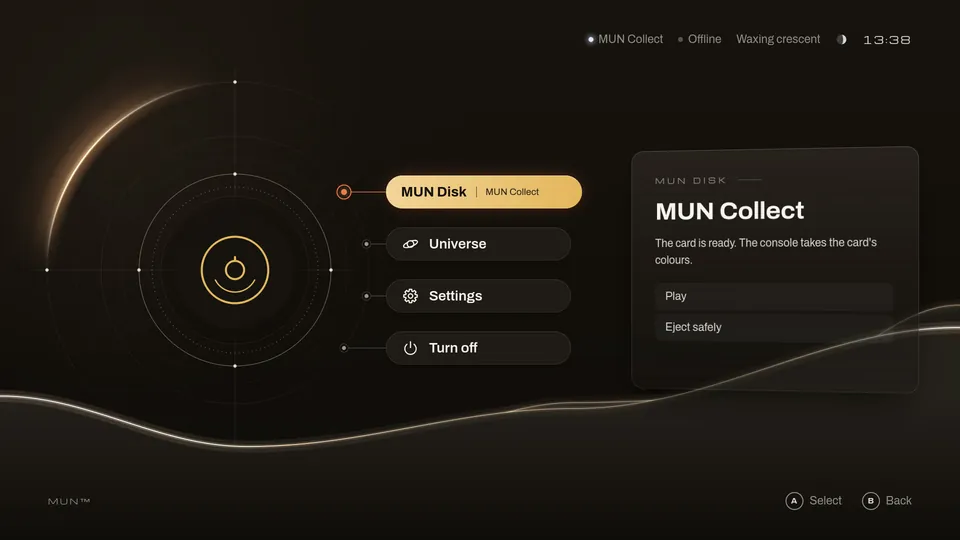
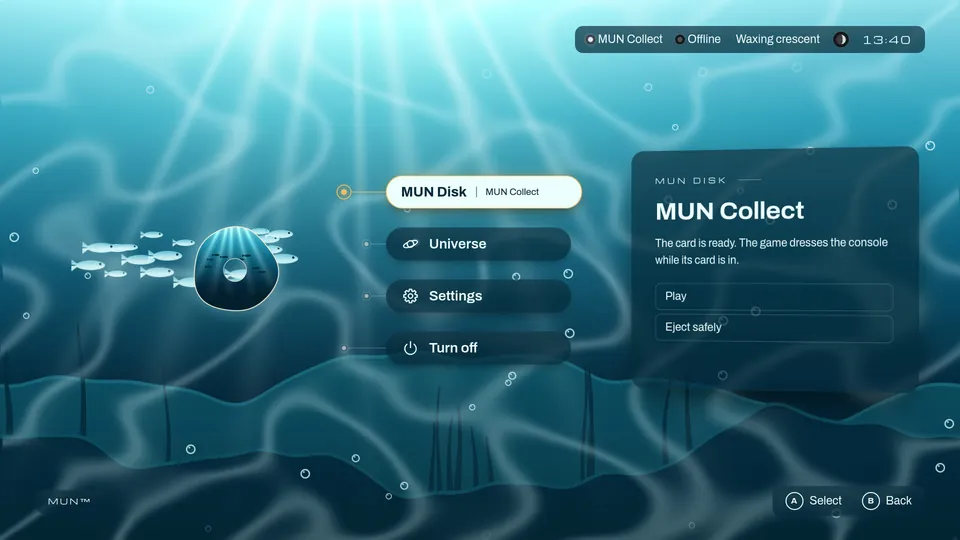
While your disc is in, MUN dresses in your game: its colours on the menus, the disc object showing your art, a world behind Home and your sounds. It is a folder on your disc: you write no code and nothing in your game changes.

Today, in MUN OS v0.1.0-dev.5

MUN OS’s home screen with MUN Collect’s MUN Disk, in MUN’s own look
Without Shape
The same screen with MUN Collect dressed in the sea example: an underwater world, glass panels and the disc object showing the sea
With the “sea” example

Start from the «sea» or «paper» examples, or from a template in your cover’s colours. For a world in motion, start from Reef: it is an experimental draft.

It takes MUN OS v0.1.0-dev.5 and, to make the disc, e2fsprogs.

Bring your gameLet’s talk

If your game exists, write to us.

We study every project with you: what it needs for MUN, how to port it and whether a physical edition on MUN Disk makes sense. It is not an automatic port nor a guaranteed release: we weigh it together.

When to write to us

  • Your game uses an engine or libraries the console does not carry yet.
  • You want to explore a physical edition on MUN Disk.
  • Your game needs features not yet offered by the v0.1.0-dev.5 preview, such as controllers in the game or disc updates.
  • You want to know whether your game fits before you start.
Ø 60 mm

In preparation We are preparing the tools to bring your game. Integration targets: GameMaker, Godot and Unreal Engine.

Let’s talk about your game →

Apps and experimentsNo format yet

Other things for MUN, later.

Today MUN OS starts games from their disc and has no format for applications. If you want to make something else for MUN, a tool or an experiment, tell us: it helps us decide what to prepare.